This site is now officially deprecated. For new posts please visit my new blog at http://siliconchaos.com
I think it would be best to start my new blog from scratch and not import the post from here. I will keep this blog online for archival and link backs.
Wednesday, February 23, 2011
Saturday, February 12, 2011
Links for 02/12/2011

-
Using BITS to Upload Files with .NET
"Although FTP is commonly used to transfer files over the Internet, it's somewhat unfriendly to firewalls, because of the various ports that need to be opened. A Microsoft solution you can use for Internet file transfer is the Background Intelligent Transfer Service, BITS for short. BITS runs in the background (hence its name) as a service and it transfers files over the browser ports (80, 443) using HTTP or HTTPS. In addition, BITS transfers are restartable, so if the transfer of a large file gets interrupted, it will resume where it left off."
Saturday, February 05, 2011
Links for 02/05/2011
-
Monkey Studio IDE | The way IDEs should be
Monkey Studio (MkS) is a cross platform IDE written in C++/Qt 4.
-
git-cola: A highly caffeinated git GUI
git-cola is a powerful GUI for git that gives you an easy way to interact with Git repositories.
-
AwesomeChartJS is a simple Javascript library that can be used to create charts based on the HTML 5 canvas element.
The main goal during development was to pick sane defaults in order to let the user create simple charts quickly with just a couple of lines of code.
One can create at almost no time bar, pie, doughnut and Pareto charts.
Wednesday, February 02, 2011
Monday, January 31, 2011
Links for 01/31/2011
-
20 Must have Drupal Modules when creating a Blog
Drupal in my opinion is as powerful as Wordpress and even more powerful. However for someone migrating from wordpress to Drupal may not know of all the modules or add-ons to install. This is an attempt to address that audience. For any blog I believe the following modules are good to start with.
-
Install Gnome Shell (From GIT) In Ubuntu 10.10 Maverick Meerkat
By compiling Gnome Shell using the instructions in this post, all the packages the Gnome Shell script will download and compile will not replace any existing libraries and it will install in your home folder, so you don't have to worry about breaking stuff on your system (excluding here the build dependencies of course, which are usual packages from the Ubuntu repositories and will install just like any other package).
-
Unity Finally Lands In Ubuntu 10.10 Maverick Repositories
If you're using Ubuntu 10.10 Maverick Meerkat already, you can install unity using the following command
-
list of all OllyDBG plugins. Since there are too many and a lot newer ones are being released every few days, we will keep updating this list.
-
OllyDbg 2.0 Final Beta! — PenTestIT
OllyDbg is a 32-bit assembler level analyzing debugger for Microsoft Windows. Emphasis on binary code analysis makes it particularly useful in cases where source is unavailable.
Thursday, January 27, 2011
Links for 01/27/2011
-
How To Create a WordPress Theme: The Ultimate WordPress Theme Tutorial
IN ONLY 11 INDIVIDUAL LESSONS this WordPress Theme Tutorial is going to show you how to build a powerful, up-to-date, WordPress Theme from scratch. As we go along I’ll explain what’s happening including (for better or worse) my thinking on certain techniques and why I’m choosing one path over another. Essentially, I’ll be teaching you everything you need to know about WordPress Theme development.
Wednesday, January 26, 2011
Links for 01/26/2011
-
The completely naked theme for WordPress
Starkers is a bare-bones WordPress theme created to act as a starting point for the theme designer.
Free of all style, presentational elements, and non-semantic markup, Starkers is the perfect ‘blank slate’ for your projects, as it’s a stripped-back version of the ‘Twenty Ten’ theme that ships with WordPress.
Best of all: it’s free and fully GPL-licensed, so you can use it for whatever you like — even your commercial projects. -
12 Unique Blender Tutorials Every Blender Enthusiast Should Know Of
Here is an incredible collection of 12 hand picked Blender tutorials every Blender and animation enthusiast should know of.
Wednesday, January 19, 2011
The Evolution of the Hipster 2000-2009

This feature appears as a spread in the November 2009 issue of Paste. The article over at pastemagazine.com goes into detail for each the years. Here's an example of 2000 and 2002:
2000: The Emo
The proto-hipster’s white belt and guyliner make for a soulful combination.
2002: The Ashton
His PBR trucker hat and faux vintage t-shirt reveal an obsession with "irony."
Read Article
Search Amazon.com Books for Hipster

Tuesday, January 18, 2011


Monday, January 10, 2011
Copy Paste: Apple iPad: A Linux Administrator’s New Assistant

"There are several SSH clients from which to choose in Apple’s App Store. Some are free, others are inexpensive and one is a bit pricey for an app at $9.99 but its extensive list of features clearly justify the extra money you’ll pay for it. The app referenced here is iSSH from Zingersoft."
"The iSSH app is not only a capable SSH client but it’s also a VNC client, telnet client and X Server. Additionally, you can open more than one SSH connection and switch between them with a finger swipe. There is a limitation of a single X connection, though so you can’t run an X session in one window and a VNC session in another. The developers actively upgrade this application and regularly expand its feature list."
"You’ll enjoy and appreciate iSSH and your iPad more as you work with them in this new support context. The iPad is the perfect portable Linux support tool for System Administrators. As the iPad matures, more apps that integrate it with Linux will appear, though admittedly; SSH, X, VNC and web-based apps are already well covered with iSSH and the Safari browser"
Read Full Article: Apple iPad: A Linux Administrator’s New Assistant
Screen-shots:
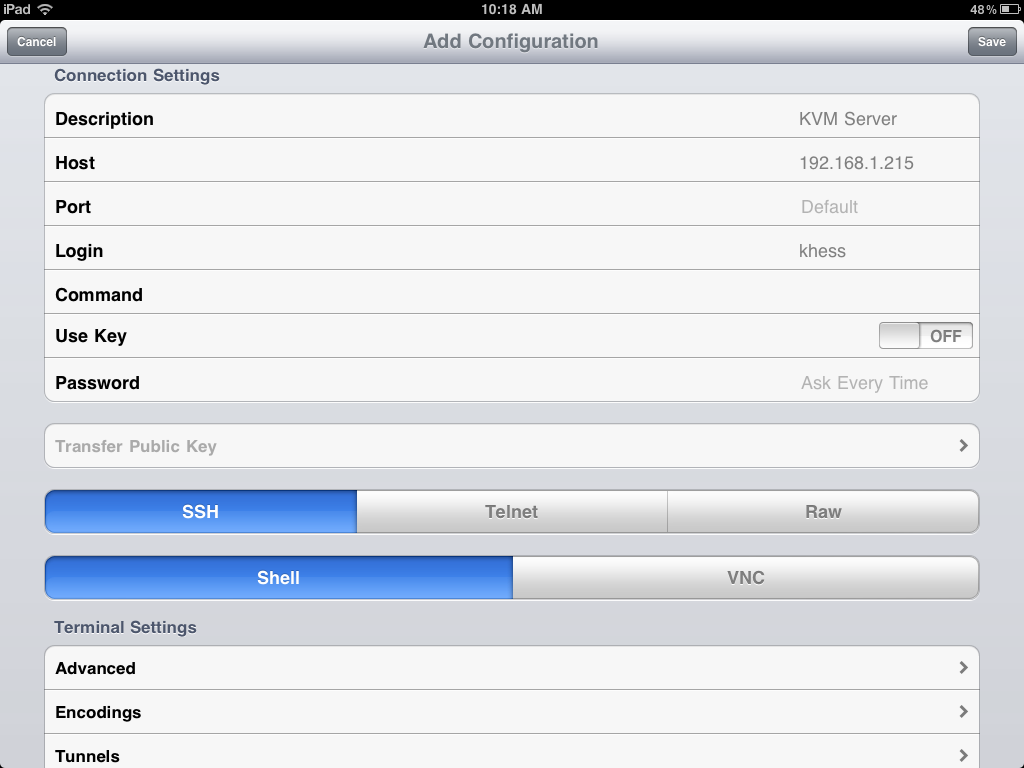 |
| Configuring a New SSH Connection Profile in iSSH |
 |
| iSSH Profile List, Edit and Configuration Screen |
 |
| iSSH X Session with Xcalc, the Multifunction Application and Keyboard. |
 |
| The Multifunction X Session Application |
 |
| iSSH VNC Profile Configuration Screen |
 |
| iSSH VNC Session Showing Target Host’s GNOME Desktop |
Images taken from source Article
Tuesday, January 04, 2011
Fake Microsoft security update spreads Autorun worm

The payload of this email is an Autorun worm installed by executing KB453396-ENU.exe.
The email has a subject line of "Update your Windows" and contains the following text:
Dear Microsoft Customer,
Please notice that Microsoft company has recently issued a Security Update for OS Microsoft Windows. The update applies to the following OS versions: Microsoft Windows 2000, Microsoft Windows XP, Microsoft Windows Vista and Microsoft Windows 7.
Please notice, that present update applies to high-priority updates category. in order to help protect your computer against security threats and performance problems, we strongly recommend you to install this update.
you can continue to improve your computer's security and decrease the possibility of infection by keeping your system up-to-date, maintaining a current antivirus software.
As your computer is set to receive notifications when new updates are available, you have received this notice.
In order to start the update, please follow the step-by-step instruction:
1. Download and run the attached KB453396-ENU.exe update file
2. Carefully follow all the instructions you see on the screen
If nothing changes after you have run the file, probably in the setting of your OS you have an indication to run all the updates at a background routine. In that case, at this point the upgrade of your OS will be finished.
We apologize for any inconvenience this back order may be causing you.
Thank you,
Steve Lipner,
Director of Security Assurance
Microsoft Corp.
Microsoft never distributes updates via email.
The Malware has been classified as W32/Autorun-BMF, and the ZIP file as Mal/BredoZp-B. Update your Antivirus software in order to have the latest definitions.
The following companies have updated their virus definitions in order to detect W32/Autorun-BMF and Mal/BredoZp-B
For more information:
Thursday, December 30, 2010
Android Trojan Geinimi
 Lookout Mobile Security blog reports the spreading of a new sophisticated trojan on Android devices. Geinimi, the Trojan has been injected into legitimate versions of Android games and apps--mostly distributed via third-party app stores in China.
Lookout believes Geinimi is capable of receiving commands from a central server, and it can collect and transmit user data. There is also the posibility that Geinimi might be setting up the infrastructure required for a botnetLookout also believes there is a possibility that Geinimi could be laying the groundwork for an Android botnet.
How do you protect yourself?
- Don't install apps from untrusted third-party application markets
- Don't enable Android's 'install from unknown sources' setting
- Install a free anti-malware
Via Download Squad
Image via Lookout Mobile Security
Beware the Facebook "awkwardhaha" scam

Naked Security just reported of a new watch-this-video survey scam. The message says, "Hey, [name]!! What the heck are you doing in this video! LOL", and links directly to a Facebook application:
http://apps.facebook.com/awkwardhaha
The link - which looks legitimate enough because of the "facebook.com" domain - redirects you to a video-hosting site. For a brief moment, you'll see a web page opening with the title "Videos here - Powered by CO.CC":

The page uses a JavaScript trick to redirect you to yet another site, which pops up a fake Facebook login page:

These types of scams aren't usually picked up by Anti-Virus or Malware applications. As with any link or download on the internet, always use caution and verify the address in your browser and do not log in to application which are not using https or have expired/unknown certificates.
Article source information and images courtesy of Naked Security. To read the source article please click here.
Wednesday, December 29, 2010

jProgr: Firefox's Configuration Folder
This article is part of the jProgr.com translation series.
 Firefox has a specific profile which contains all of its settings, tweaks here and there that you have done to your favorite browser. It is useful to know this when we have two computers or reinstall your OS and you don't want to configure Firefox from Zero to customize it to your liking.
As I mentioned, the complete profile is kept in one folder, which you can copy to other installations of Firefox to have it like that of our home computer (or wherever). The folder is in C:\users\[username]\AppData\Roaming\Mozilla\Firefox\Profiles\ on Windows 7 and Vista, on Mac it would be under /Library/Application Support/Firefox/Profiles/[random].[profile]/ and for Linux it can be found in /home/[username]/.mozilla/firefox/[random].[profile]. You can copy the location for your OS and paste it into the navigation bar of your file browser so you don't have to search folder by folder.
Copying that folder you now have a backing of your browser settings for use in emergencies, we can also make an automatic backup of the profile with the help of an extension, which saves you time by having to look for the folder, in addition you'll now have up to date copies/backups of your profile settings.
The next time you install Firefox on a machine and want to have the same configuration that you already have on your PC you know that copying a single folder you'll have everything resolved.
Source Article: La carpeta de configuraciones de Firefox(una muy importante)
Published on: 2010/03/26
Author: jProgr
jProgr: The future of security on the iPhone

In France an attack was able to modify the wallpaper of many iPhones thanks to a vulnerability in the SSH protocol. Victims were presented with a message to visit a certain web site and pay $4.95 using PayPal in order to receive instruction on securing their iPhone and preventing worse types of attacks. via SpamLoco.net

In the beginning Windows had a formidable "barrier" that had no virus, but now you can't click on a link without thinking twice. Mac OS is going through this process very slowly, and Linux still offers a decent "barrier" when it comes to security.
The iPhone, with more and more sales, is under increasing attack. It is not the first but currently has one of the fastest growing markets and I assure you it will not be the last. Take for example smartphones (the iPhone is a level higher than a smartphone) at the beginning you could navigate without worries, but now there are even AntiVirus for these devices.
Is a matter of time, but in the future we will have to be so careful while browsing and sharing files on Apple's star gadget as well as when you connect your flash drive in your own computer. And of course, as in Windows, it will become more and more expensive to own an iPhone, you will have to pay for extra security applications (whether antivirus, firewall, etc..) because any improvement in security that Apple develops for the iPhone it is going to be violated as it is in Windows.
Now with the scales balanced, let's see who is better at this: Microsoft or Apple.
Source Article: El futuro de la seguridad en el iPhone
Published on: 2009/11/05
Author: jProgr
Thanks for another great article jProgr.com
Tuesday, December 28, 2010
Linux Toolbox: Bang (!) Commands
Most modern shells support csh's bang commands - bash, tcsh and zsh all do. While some bang commands don't work in all those shells, all of the following do.
For the purposes of these tips, every tip will assume these are the last three commands you ran:
Getting stuff from the last command:
Accessing commandlines by pattern:
The double bang !! comes in very handy whenever you need to re-execute a command using sudo if you don't have the required permissions, all you need to do is execute the following:
via: ILUG Mailing List
For the purposes of these tips, every tip will assume these are the last three commands you ran:
% which firefox

% make

% ./foo -f foo.conf

% vi foo.c bar.c
Getting stuff from the last command:
Full line:  % !!           becomes:  % vi foo.c bar.c
Last arg :  % svn ci !$    becomes:  % svn ci bar.c
All args :  % svn ci !*    becomes:  % svn ci foo.c bar.c
First arg:  % svn ci !!:1  becomes:  % svn ci foo.c
Accessing commandlines by pattern:
Full line:  % !./f          becomes:  % ./foo -f foo.conf
Full line:  % vi `!whi`     becomes:  % vi `which firefox`
Last arg :  % vi !./f:$     becomes:  % vi foo.conf
All args :  % ./bar !./f:*  becomes:  % ./bar -f foo.conf
First arg:  % svn ci !vi:1  becomes:  % svn ci foo.c
The double bang !! comes in very handy whenever you need to re-execute a command using sudo if you don't have the required permissions, all you need to do is execute the following:
sudo !!
via: ILUG Mailing List
Monday, December 27, 2010
Winter 2011 Anime Schedule
The Winter 2011 Anime Schedule looks promising. Here is a list of the Anime I plan to watch (at least the first two episodes) in chronological order:
 Houkago no Pleiades
Air Date: Jan 2011
Producers: Gainax
Genres: Cars
 Rio: Rainbow Gate!
Air Date: Jan 4, 2011
Producers: Xebec
Genres: Comedy, Ecchi
 IS: Infinite Stratos
Air Date: Jan 6, 2011
Producers: 8bit
Genres: Action, Mecha, Sci-Fi, Shounen
 Yumekui Merry
Air Date: Jan 6, 2011
Producers: J.C. Staff
Genres: Action, Supernatural


Air Date: Jan 2011
Producers: Gainax
Genres: Cars
A collaboration between Gainax and the car maker Subaru.

Air Date: Jan 4, 2011
Producers: Xebec
Genres: Comedy, Ecchi
Anime featuring Rio, a character from slot machines.

Air Date: Jan 6, 2011
Producers: 8bit
Genres: Action, Mecha, Sci-Fi, Shounen
Japan engineered an armed powered exoskeleton "Infinite Stratos" (IS) and it became the mainstream of weapons. Since only women can operate IS, women dominate the society over men. Orimura Ichika is a 15 year old boy and accidentally touches an IS placed in the IS pilot training school. He is found to be the only man who can operate IS and forced to enter the training school. Ichika's busy school life surrounded by girls has begun.

Air Date: Jan 6, 2011
Producers: J.C. Staff
Genres: Action, Supernatural
Ten years ago Fujiwara noticed he had a power to see multicolored auras surrounding the person's body. Ever since then he's been having a weird dream about a war with cats. Then one day a mysterious girl falls on top of him...

Tuesday, December 21, 2010

Subscribe to:
Posts (Atom)